
Stay informed with outbound payment notifications
Merchants are able to sign up for merchant notifications in the Payments Portal to stay updated on vendor activity and check activity.
With Outbound notifications enabled, merchants are able to receive updates for:
Vendor Approval status
-
Approved
-
Denied
- Updated
Check Activity status
-
Printed
-
Mailed
-
In transit
-
Delivered
-
Failed
-
Canceled
These notifications provide clear communication around payment activity so teams can monitor vendor status and track outbound payments without checking the portal throughout the day.
How to enable Outbound notifications-
To access Notifications follow the steps below:
Login to the Payments Portal (click here to log in)
Click on Settings and then Notifications located in the navigation bar on the left side of the portal.
-
Default view will display Merchant Notifications
-
Select the Outbound Payment notification(s) to receive.
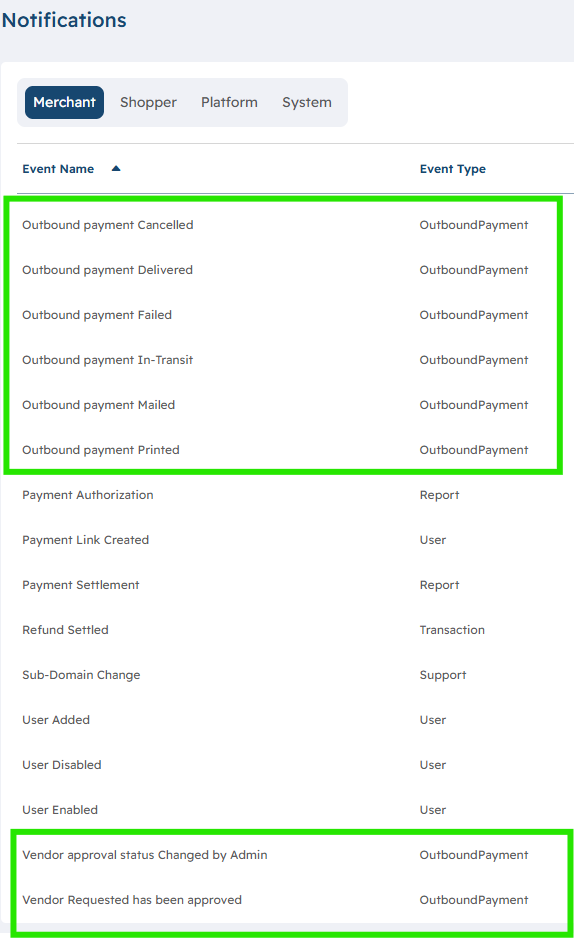
After selecting the notification that you would like to turn on, click the Add Email button

If a team manages outbound payments regularly, these alerts can support faster follow-up and better visibility into each payment’s status.
A window opens that allows you to add either a single or multiple emails separated by semicolons (;) or commas (,).

Under Event Details, ensure that the Disabled button is toggled to Enabled.

Related Articles:
If you need assistance or have any further questions, please click here to contact our support team.