
Check out our How-to video or follow the steps below:
Invoice Search
Customers can choose between
- Standard Anytime Payment (one-time payment without invoice)
- Anytime Payment: (one-time payment without an invoice)
- Enters Payment amount, Contact info, reference
- Complete Payment details
- Anytime Payment: (one-time payment without an invoice)
- AMS360 Invoice Lookup (search and pay specific invoices)
- Invoice Lookup:
- Enter in an Invoice Number to retrieve and display the following for a single invoice:
- Customer Name and Number
- Invoice Amount and Dates
- Invoice Description
- Due Date Status (overdue invoices highlighted in red)
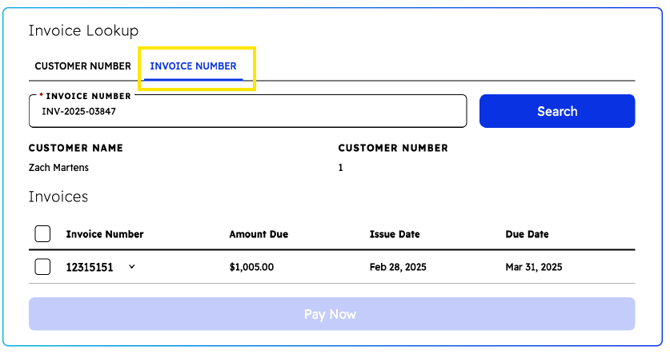
- Enter in an Invoice Number to retrieve and display the following for a single invoice:
- Customer Number Lookup:
- Enter a Customer Number & Zip Code to retrieve and display the following information for all outstanding invoices for that customer:
- Customer Name and Number
- Invoice Amount and Dates
- Invoice Description
- Due Date Status (overdue invoices highlighted in red)
- Then either one or multiple invoices can be selected to pay at once.
-1.png?width=670&height=402&name=image%20(1)-1.png)
- Enter a Customer Number & Zip Code to retrieve and display the following information for all outstanding invoices for that customer:
- Invoice Lookup:
Payment Process
Making Payments: Payment Processing- Paying one or multiple Invoices
- Select payment method (credit card, debit card, or ACH if within limits)
- Technology fee is automatically calculated and displayed
- Associated Invoices are identified and linked for consolidated payment options
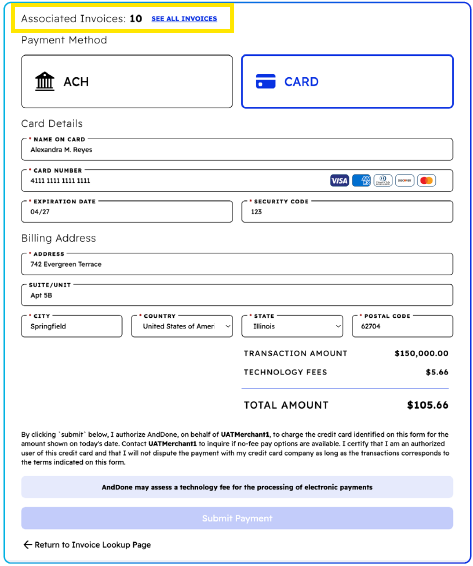
Important: When invoice amounts exceed ACH limits, only card payments are available
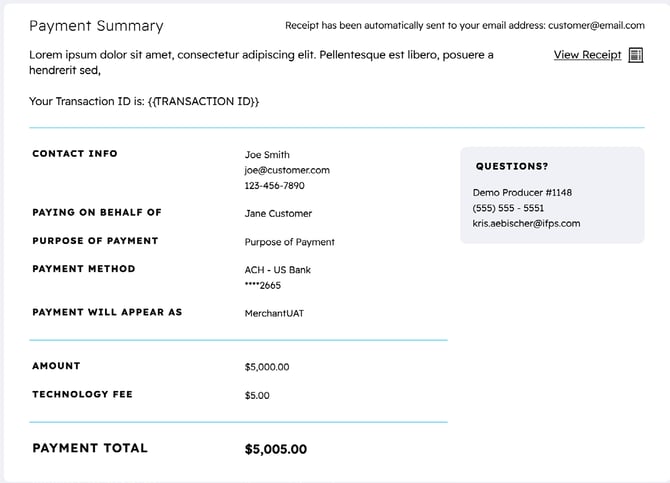
Payment confirmation and receipt generation
Duplicate Prevention:
Once an invoice is paid, the system prevents additional payments on the same invoice.
Related Articles
What are the accepted payment types?
Making a payment using Anytime Payments or Unique Payment Links.
Questions? If you need assistance or have any further questions, please click here to contact our support team.