
To enable this feature access Daily Reports follow the steps below:
Login to the Payments Portal (click here to log in)
Click on Reporting located in the navigation bar on the left side of the portal.
Next Toggle on to "Include all auth or settled transactions" under the Daily AMS360 Reports
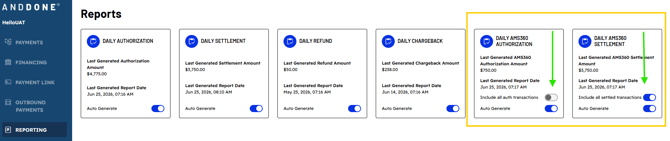
Once toggle is enabled the reports will include:
- AMS360-generated payments
- Non-AMS360 payments
For non-AMS360 transactions, the report uses Smart Name Match to populate the payer name in this order:
- Company Name
- Person Name
- Bank or card account holder name
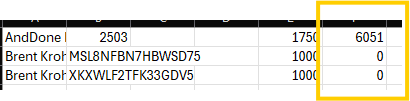
Non-AMS360 transactions will display with the following values:
- Invoice:
0 - Policy #: blank
- Check Amount: total transaction amount
- Please see example below- "0" is used in the Invoice column on CSV report where the AMS360 Invoice is populated. Thus designating that the transaction is not an AMS360 invoice payment.
- Please see example below- "0" is used in the Invoice column on CSV report where the AMS360 Invoice is populated. Thus designating that the transaction is not an AMS360 invoice payment.
Consolidating AMS360 and non-AMS360 transactions into one report supports more complete payer identification on non-AMS360 transactions and can reduce manual updates during reconciliation.
This feature option supports a more complete authorization and/or settlement report while keeping non-AMS360 transactions easy to identify.
Related Articles
How to Post Receipts for AMS360 Invoices
Daily AMS360 Reporting in Payments Portal
How to pay an AMS360 invoice using an Anytime Payment link
If you need assistance or have any further questions, please click here to contact our support team.