
Follow the steps below in your AMS360 account to select your preferred bank and setup the AndDone user to your designated bank (matching the App Access Key you previously sent to AndDone Onboarding).
Here is a step-by-step video:
or Follow these steps:
In AMS360>> Select Bank>> then select preferred Bank account>> Edit >> Employee Authorization>> New>> Add the AndDone User >> & SAVE.
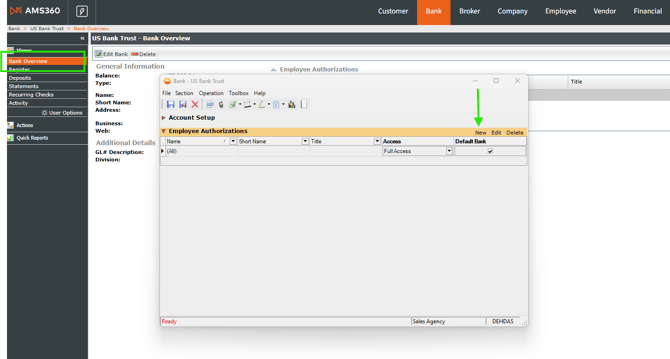
The AndDone User should contain the same App Access Key you previously sent to AndDone Onboarding. Do not forget to Save the New User once it appears on the list.
Next verify the bank short name sync was successful in the Payments Portal
-
To access the Bank Short name in your Payments Portal follow the steps below:
-
Login to the Payments Portal (click here to log in)
-
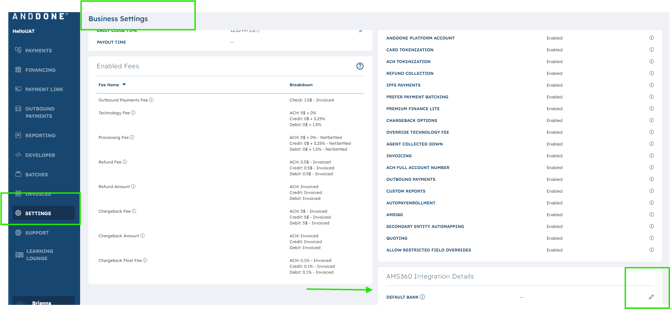
Click on Settings located in the navigation bar on the left side of the portal.
-
Select Business Settings and locate the AMS360 Integration Details edit pencil.
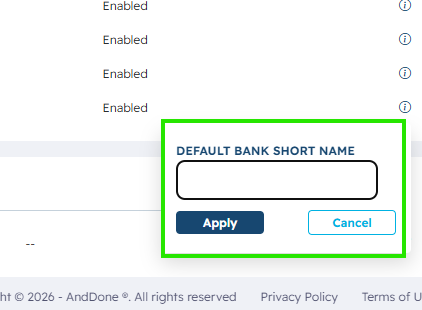
Select the preferred bank short name and click Apply
Related Articles:
Viewing AMS360 transactions in the AndDone Payments Portal
How to pay an AMS360 invoice using an Anytime Payment link
Questions? If you need assistance or have any further questions, please click here to contact our support team.